
Knowledge
Territory workspace
A visual guide to the DrowAI Knowledge Territory tab and its read-only topology map.
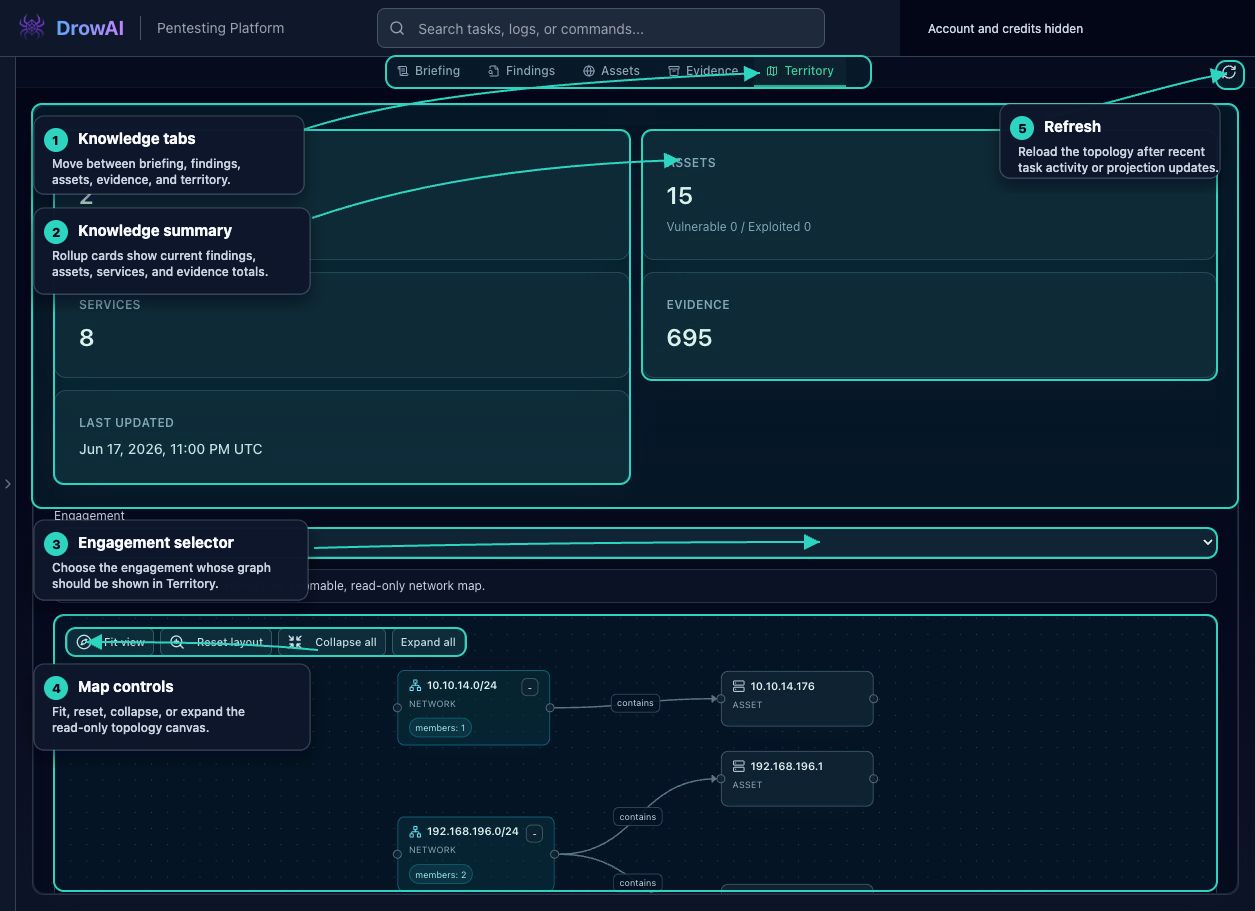
The Territory tab presents an engagement-scoped topology view. It helps operators see how observed networks, assets, services, and relationships fit together during review.
Primary regions
- Knowledge tabs switch between Briefing, Findings, Assets, Evidence, and Territory.
- Summary cards keep topology review connected to current knowledge totals.
- The engagement selector chooses which active engagement graph is displayed.
- The graph panel shows engagement-scoped relationship and web-surface context.
- Map controls help fit, reset, collapse, expand, or refresh the topology canvas.
- Refresh reloads the graph after recent task activity or projection updates.
How to read it
Territory is not a replacement for evidence review. Use it to orient yourself to relationships and then drill back into assets, findings, and evidence when you need source support for a claim.
Public-safe handling
Territory views can reveal internal address ranges and relationship structure. Use approved lab screenshots for public material, or mask sensitive customer topology before publication.